

Connect a Telegram bot
Create a Telegram bot and connect it so an agent answers whoever writes to it.
With a Telegram bot, your customers chat with your agent from Telegram. TukiAssistant sets up the bot’s webhook for you.
Steps
-
In Telegram, open a chat with @BotFather and send
/newbot. -
Choose a name and a username for the bot. BotFather replies with the bot token: a text like
123456789:AA.... Copy it. -
In TukiAssistant, open Integrations in the sidebar.
-
Under Add integration, click Telegram.
-
Enter an Integration name and paste the token in Bot Token.
-
In Agent, choose the agent that will answer.
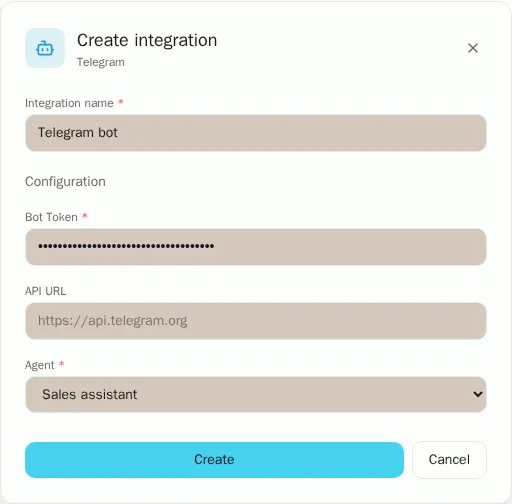
-
Click Create. TukiAssistant registers the webhook with Telegram.
-
Write to your bot from Telegram. The agent answers within a few seconds.